
Valorant: Za Dużo FPS psuje Tickrate klienta – Problem Desync Packet Rate
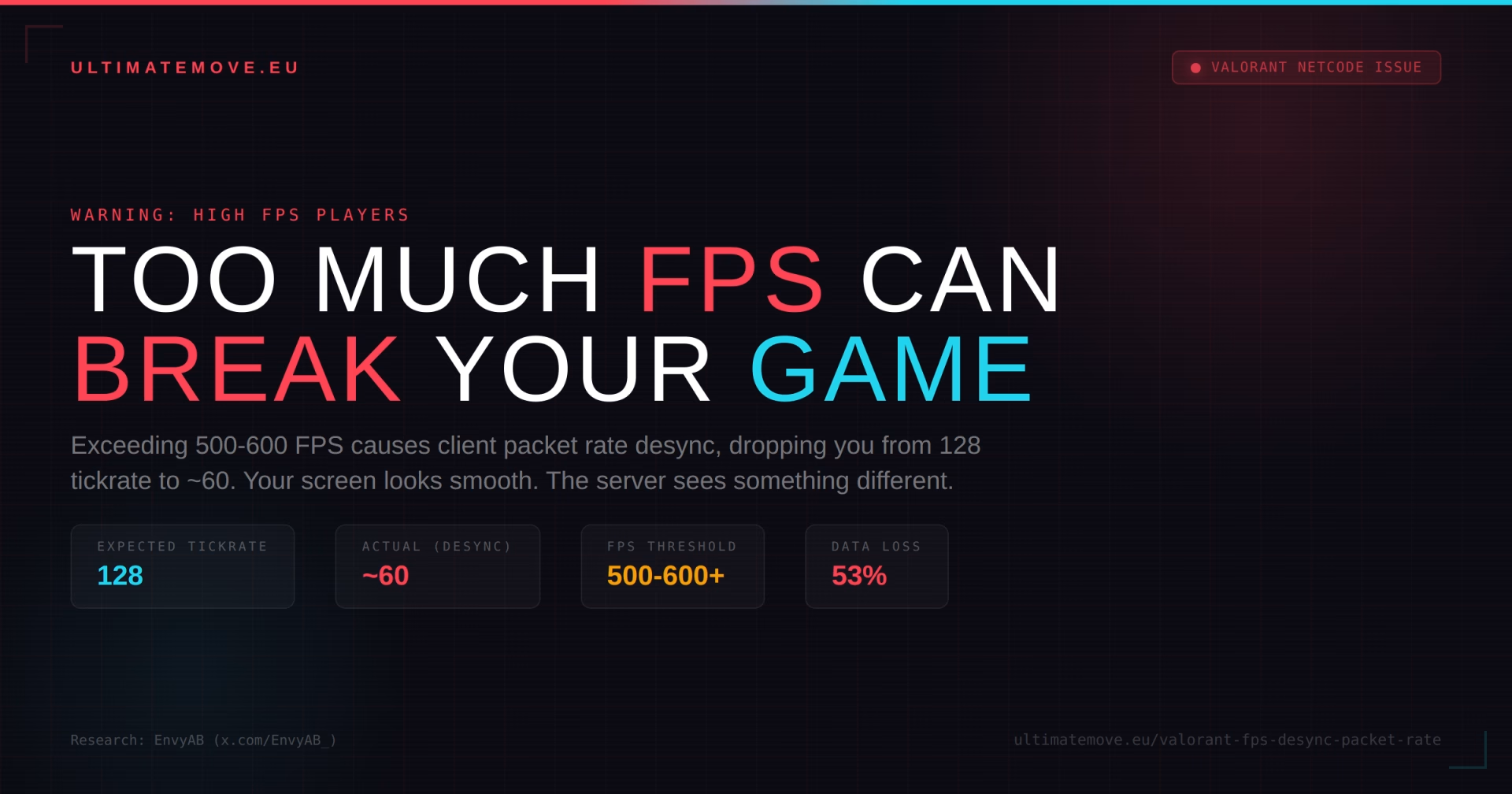
Brzmi absurdalnie, prawda? „Za dużo FPS” jako problem. W końcu od lat słyszymy że więcej klatek = lepiej. Kupujesz droższą kartę, lepszy procesor, optymalizujesz system – wszystko po to żeby wycisnąć jak najwięcej FPS. A tu nagle okazuje się, że przekroczenie 500-600 FPS w Valorancie może aktywnie pogarszać Twoją rozgrywkę.
Wielu ludzi nadal szydzi z optymalizacji, z szukania tweaków z różnych form zmniejszania input laga itd… – Dziś To nie jest mit. To nie jest „uczucie.” To jest mierzalny, powtarzalny problem z packet rate klienta, który powoduje że Twój komputer traci synchronizację z serwerem.
Na czym polega problem?
Valorant działa na serwerach 128-tick. Twój klient (gra na Twoim PC) wysyła i odbiera dane z serwera z określoną częstotliwością – SEND rate i RECEIVE rate. W idealnym świecie obie te wartości wynoszą stabilne 128.
Problem pojawia się gdy FPS przekracza pewien próg (zazwyczaj 500-600+). Silnik Valoranta zaczyna redukować packet rate klienta. Zamiast wysyłać i odbierać dane 128 razy na sekundę, Twój klient zaczyna fluktuować – spada do średnio ~60, skacze z powrotem, spada znowu lub utrzymuje stałą średnią wartość.
Co to oznacza w praktyce:
Pierwszy mecz po uruchomieniu gry zazwyczaj działa idealnie – send i receive rate są stabilne na 128.
Drugi mecz i kolejne – silnik zaczyna redukować pakiety. Możesz pomyśleć „ok, to mała różnica.” Ale to OGROMNA różnica.
Gdy Twój receive rate spada poniżej 128, nie dostajesz danych z serwera w real-time. Serwer wie gdzie jest wrogi gracz. Twój klient nie. Powstaje opóźnienie, które sprawia że:
Trzymanie kąta staje się ekstremalnie trudne – wróg Cię widzi ułamek sekundy wcześniej niż Ty jego, bo Twój klient nie jest zsynchronizowany z serwerem przez co masz uczucie grania na bogów gry (ferrari peek).
Strzały w głowę rejestrują się jako strzały w ścianę (lub nie rejestrują się wcale) – na Twoim ekranie celujesz w głowę, ale serwer widzi wroga w innym miejscu niż Ty.
„Insta-heady” – wydaje Ci się że dopiero kogoś zobaczyłeś, a on już Ci strzelił w głowę. Bo faktycznie Cię zobaczył wcześniej – Twój klient po prostu nie dostał tej informacji na czas.
Aktualnie występuje sytuacja realnej przewagi kiedy ktoś faktycznie odpalił dopiero gre – gra 1 mecz, a Ty kilka już i nawet o tym nie wiesz w jak dużej przewadze jest przeciwnik, kuriozalna sytuacja.
Kto odkrył ten problem?
Temat nagłośnił EnvyAB – W swoim filmie na YouTube szczegółowo pokazuje dane z packet rate, demonstrując jak stabilne 128 SEND/RECEIVE w pierwszym meczu degraduje się w kolejnych grach przy wysokim FPS.
Źródło: youtube.com/watch?v=v0ynZXNGADc (EnvyAB) Twitter/X: x.com/EnvyAB_
Podobne objawy opisują gracze na forach Blur Busters: bardzo wysoki FPS w Valorancie bez spadków klatek, a mimo to gra wydaje się mniej responsywna.
Łączymy się z Twoim komputerem zdalnie, zapisujemy punkt przywracania i przechodzimy przez zasilanie, sterowniki i input. BIOS ustawiamy razem na rozmowie na Discordzie, kiedy pokazujesz nam ekran telefonem. Ten sam benchmark na końcu pokazuje, ile z tego wyszło. Przez pół roku po sesji zostajemy z Tobą na Discordzie.
Jak to naprawić?
Ogranicz FPS w Valorancie. To jest najprostsze i najskuteczniejsze rozwiązanie.
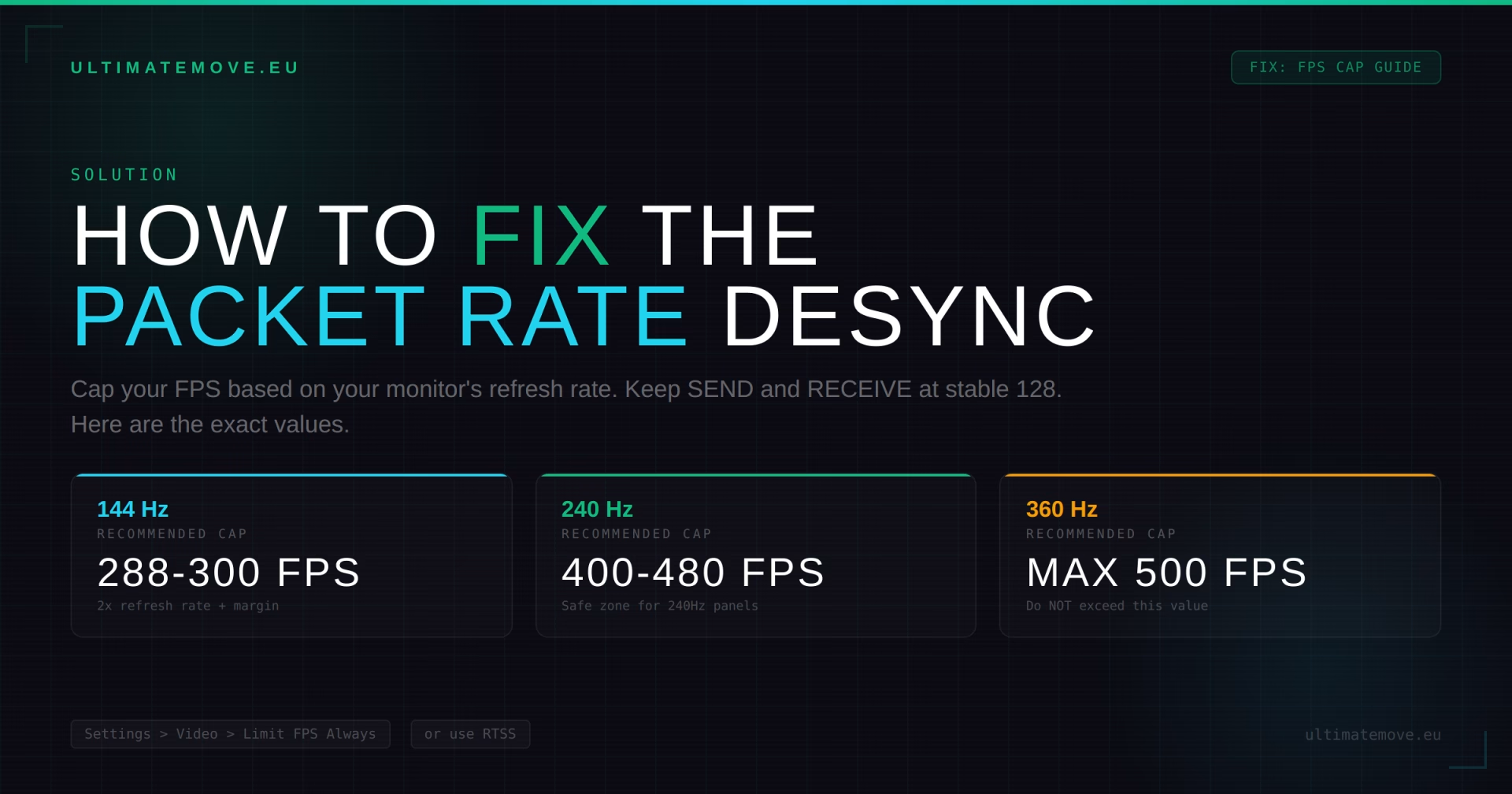
Zalecany FPS cap: Ustaw limit na wartość odpowiadającą Twojemu monitorowi:
- Monitor 144Hz -> cap na 288-300 FPS (podwójna wartość refresh rate + margines)
- Monitor 240Hz -> cap na 400-480 FPS (wartość specyficzna dla sieciowego zachowania Valoranta; ogólna zasada „refresh minus 3” z poradnika ustawień ma inny cel)
- Monitor 360Hz -> cap na 500 FPS (NIE więcej)
Jak ustawić FPS cap w Valorancie:
- Wejdź w Settings > Video > General
- Znajdź „Limit FPS Always” i ustaw odpowiednią wartość
- Alternatywnie: użyj RTSS (RivaTuner Statistics Server) dla dokładniejszego frame limitu
Dodatkowe kroki:
- Monitoruj w grze Network Round Trip Time, Packet Loss, Server Tick Rate i Client FPS (Settings > Video > Stats). Menu nie pokazuje send/receive packet rate
- Jeśli widzisz fluktuacje poniżej 128, obniż cap FPS
- Zrestartuj klienta Valoranta między sesjami jeśli zauważysz degradację
Komendy do monitorowania w grze:
- Włącz „Network Round Trip Time” i „Incoming/Outgoing Packet Loss” w ustawieniach statystyk
- Obserwuj czy SEND i RECEIVE trzymają się na 128
Dlaczego Riot tego nie naprawi?
Riot jest świadomy problemu. W Patchu 3.10 (2021) naprawili bug gdzie „gracze z ponad 128 FPS doświadczali packet loss.” Ale problem wrócił w nowszych wersjach – lub nigdy nie został w pełni naprawiony dla ekstremalnie wysokich wartości FPS.
Prawdopodobnie Riot zakłada że „nikt nie potrzebuje 600+ FPS” – ale z każdą generacją sprzętu coraz więcej graczy przekracza ten próg naturalnie, nie wspominając o monitorach celujących w 1000hz + w przyszłości.
Kogo to dotyczy?
Jeśli masz mocny PC i grasz w Valoranta bez FPS capa do 500 – jest spora szansa że ten problem dotyka właśnie Ciebie i nawet o tym nie wiesz. Objawy są subtelne: gra wygląda płynnie, nie ma stutterów, ping jest niski. Po prostu „hit reg jest dziwny” i „czujesz się wolniejszy niż przeciwnik.”
Jeśli kiedykolwiek miałeś uczucie że „pierwszy mecz dnia jest świetny, a potem jest coraz gorzej” – to może nie być tilt. To może być degradacja packet rate.
Podsumowanie
Za dużo FPS w Valorancie (500-600+) może powodować desync packet rate klienta, co skutkuje wypadnięciem z tickrate 128 i fluktuacjami do ~60. Oznacza to mniej danych, mniej aktualny obraz sytuacji na serwerze i realne pogorszenie hit regu, peeków i ogólnej responsywności gry.
Fix jest prosty: ogranicz FPS. Monitoruj packet rate. Jeśli SEND i RECEIVE spadają poniżej 128, Twój cap jest za wysoki.
Masz problem z FPS, stutterami lub optymalizacją? Nasza usługa PC Optimization obejmuje dokładnie takie przypadki. Jeśli chcesz porozmawiać o ustawieniach – wpadnij na Discorda lub na stream.
 KaRzye
Prowadzi research i wszystkie sesje w UltimateMove. FACEIT Level 10 w CS2,
Immortal w Valorancie. Dwadzieścia lat w BIOS-ie, pamięciach i sterownikach.
Zobacz jak gra.
KaRzye
Prowadzi research i wszystkie sesje w UltimateMove. FACEIT Level 10 w CS2,
Immortal w Valorancie. Dwadzieścia lat w BIOS-ie, pamięciach i sterownikach.
Zobacz jak gra.
Nasze darmowe narzędzia
Zbudowane in house. Bez konta, bez limitu.
 Ultimate Demo Analyzer
Wrzucasz demo z CS2, dostajesz rozpisane błędy i statystyki rundy.
Za darmo, bez konta Deadlock Replay Analyzer
To samo dla Deadlocka: analiza powtórki i plan na kolejne mecze.
Za darmo, bez konta Konwerter czułości
Przenosisz cm/360 między grami bez gubienia pamięci mięśniowej.
Za darmo, bez konta Trener celności
Trzydzieści sekund, trzy poziomy. Bez instalacji i bez konta.
Za darmo, bez kontaCzytaj dalej
 Gaming Research
Intel APX w Windows 11: co daje nowy przełącznik i kiedy przyspieszy gry
2026-10-26·4 min czytania Gaming Research
Intel czy AMD do gier w 2027: kupić teraz czy czekać na Nova Lake i Zen 6
2026-10-26·4 min czytania Gaming Research


