Best PC Optimization Services Gaming Remote 2026
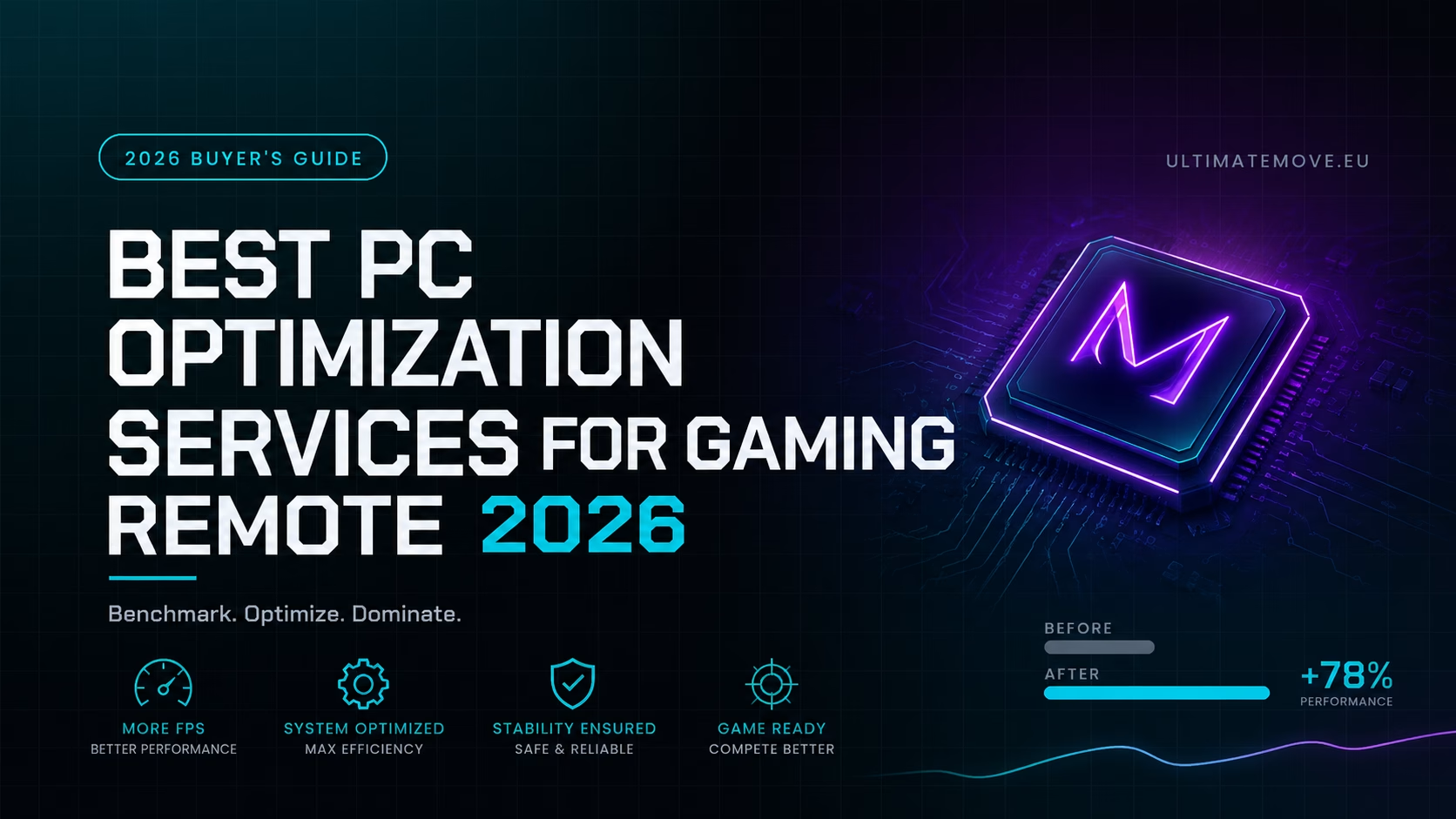
Every year the same story. Someone spends 2,000-4,000 dollars on a new rig, boots up CS2 or Tarkov, looks at a frametime graph that resembles a seismograph and concludes that "the game is just badly optimized". Half the time the game is not the problem. The problem is the chain of events between the mouse click and the photon leaving the monitor - a chain nobody ever configured.
This guide covers what a remote PC optimization service actually is in 2026, how to tell real engineering from a repackaged "cleaner.exe", what results are realistic on your hardware, and why UltimateMove's remote optimization packages are built on measurement rather than vibes.
What a PC optimization service actually is in 2026
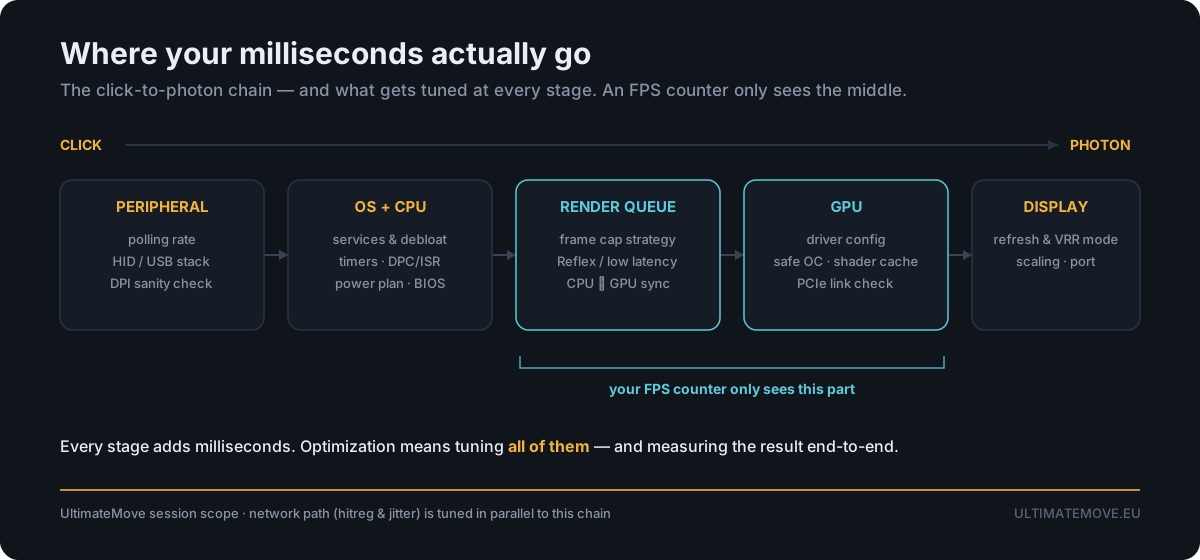
A legitimate optimization service is a live engineering session on your machine, not a download. The technician works through every layer that can cost you frames or milliseconds:
- BIOS/UEFI - memory profiles and timings, power behaviour, PCIe link verification, disabling features that quietly tax performance.
- Windows - surgical debloat, background services, scheduler and power plan, timer behaviour, driver cleanup, correct NVIDIA/AMD control panel configuration.
- Memory - actually enabling and stabilising the speed printed on your RAM kit, plus manual tuning beyond the profile on Ultimate, where the silicon allows.
- Latency chain - render queue, Reflex/Anti-Lag configuration, polling, the DPC/ISR level behind micro-stutter.
- Network - adapter and system settings tuned for stable hit registration, not for a pretty ping number in the corner.
The deliverable is not "your PC feels faster". The deliverable is a before-and-after benchmark in the games you actually play, at the settings you actually use.
Why even a brand-new gaming PC leaves performance on the table
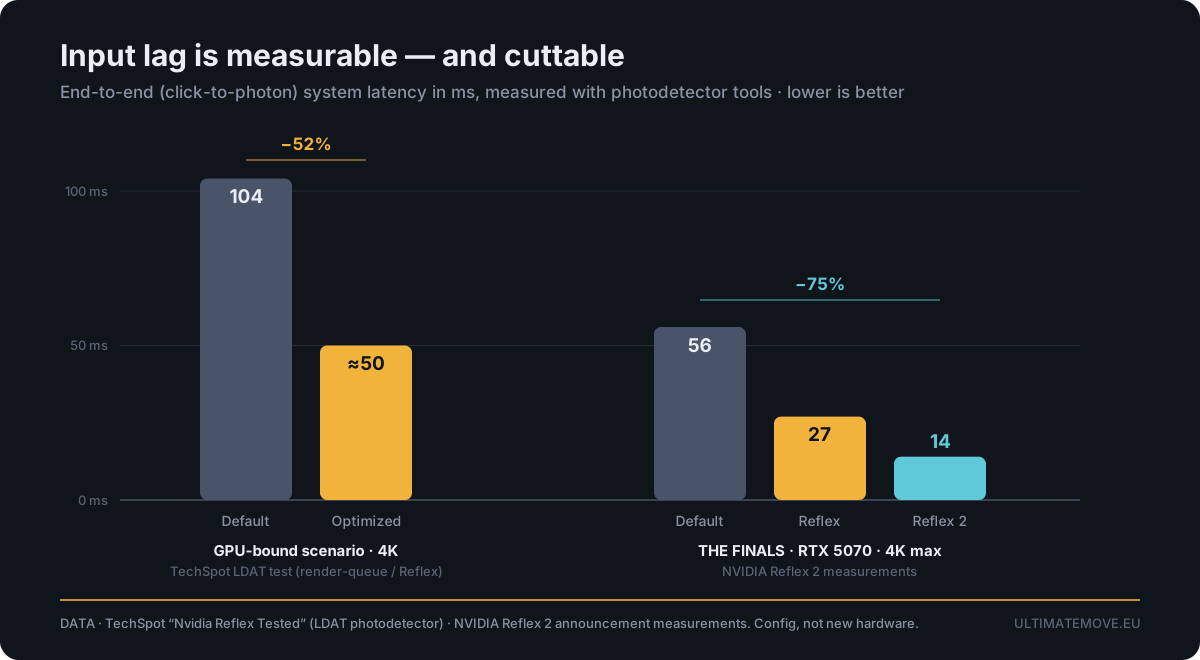
None of the numbers below are ours. They come from independent published testing, and that is exactly the point: optimization is measurable engineering, not placebo.
Windows security features cost you frames
Windows 11 ships with Virtualization-Based Security and Memory Integrity (HVCI) enabled, and silently re-enables them after major updates. Independent testing across 15 titles measured an average framerate cost of roughly 5% at 1080p, with worst cases near 11%, while Tom's Hardware recorded penalties as high as 15% - on an RTX 4090. Sensible protection for an office laptop. A pure handicap on a tournament rig. What stays on is a decision we make together, based on how you use the machine.
Your RAM is almost certainly slower than what you paid for
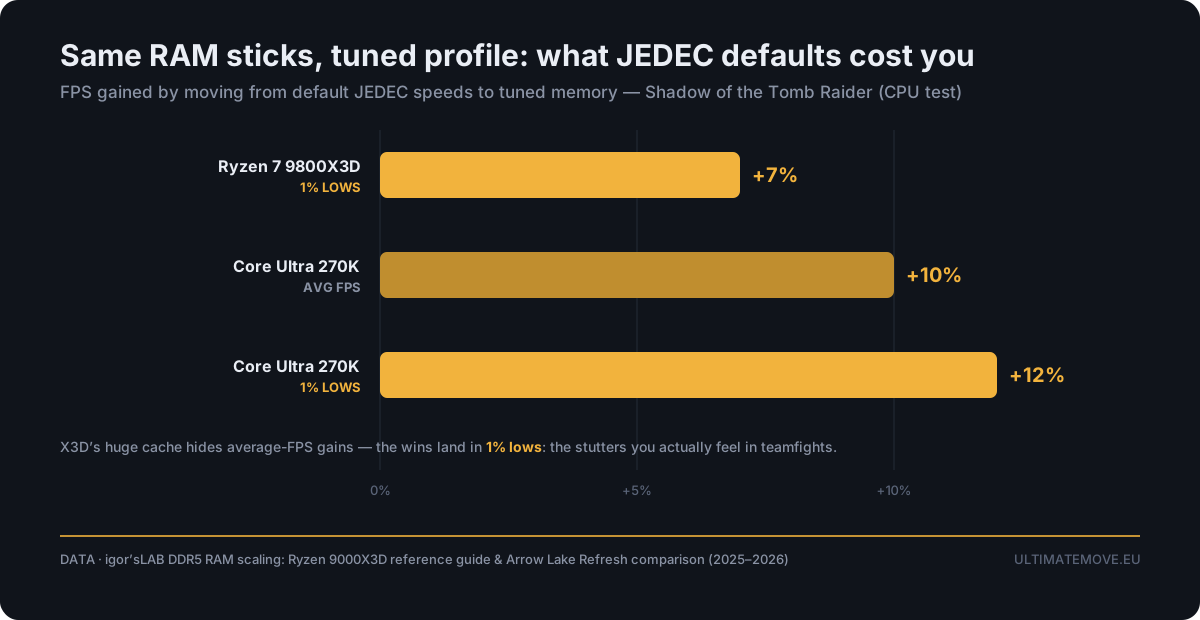
Out of the box, memory runs at conservative JEDEC defaults, not the speed printed on the kit. And it hides well: average FPS can look perfectly healthy while frametime consistency quietly falls apart. igor'sLAB's DDR5 scaling tests show what proper memory configuration is worth - up to +12% in 1% lows on Arrow Lake, and +7% in 1% lows even on a 9800X3D, a CPU whose enormous cache normally masks memory differences entirely.
1% lows are exactly the stutters you feel in a teamfight. That is the metric that decides duels, not the big number on the overlay.
High FPS does not mean low input lag
Input lag is a chain: mouse, USB polling, OS scheduling, render queue, GPU, display. An FPS counter only ever sees the middle of it. Click-to-photon measurements show the scale of it: TechSpot measured total system latency falling from around 104 ms to under 50 ms in a GPU-bound scenario purely through proper render-queue configuration, and NVIDIA's own THE FINALS testing shows 56, 27 and 14 ms as latency features are correctly enabled.
Most of those milliseconds live in configuration, not in a new graphics card.
BIOS, memory, network and input we go through together on your screen. We measure before and after in your games, so you see the difference yourself, before we hang up.
How to choose the best remote PC optimization service in 2026 - 7 checks
Apply this list to any provider. Including us.
1. Do they benchmark before and after, in your games?
Without a baseline there is no proof. Synthetic-benchmark theatre does not count - the "before" has to be your title, your settings, the same scene.
2. Do they measure 1% and 0.1% lows, not just average FPS?
A stable 144 feels better than a spiky 200. Anyone quoting only the average is optimising for the screenshot.
3. Is there a backup and restore point before anything is touched?
Non-negotiable. Every change should be documented and reversible.
4. Is it anti-cheat clean?
No game file modification, no code injection, no kernel-level hacks. System and hardware configuration only - nothing that puts you at risk with VAC, Vanguard, Ricochet, FACEIT or ESEA.
5. Is it a live session you can watch?
You should see every step on your own screen, be able to ask why a setting was changed, and stop at any moment.
6. Will they tell you when the answer is no?
Sometimes your GPU is the wall. An honest provider says so and points at the upgrade that would actually move the number, instead of selling placebo.
7. Is there support after the session?
Windows updates roll back some of the good work (VBS re-enabling itself is the classic). You want someone reachable afterwards.
Red flags: what to avoid
- "Magic" optimizer .exe files and one-click tools. If a single executable unlocked 30% more FPS on every configuration, hardware reviewers would have noticed long ago.
- Random YouTube and TikTok tweak lists. Copied registry edits and disabled services that made sense on Windows 7, pasted blindly into Windows 11 in 2026.
- Anything touching game files or game memory. That is not optimization, that is a ban risk.
- Providers who will not show numbers. "Trust me bro" is not a benchmark.
- Overclocks tuned for a screenshot. A clock that survives validation but dies in match three is worse than stock.
The UltimateMove packages compared
Every package is a live session with a technician. Never a script, never automated.
| Gaming PC Troubleshooting | Windows 11 Gaming Optimization | Ultimate Optimization | |
|---|---|---|---|
| Price | 50 $ | 60 $ | 120$ |
| Time | 60 min | 60 min | 90 min |
| For Who | A specific problem: stuttering, FPS drops, crashes, input lag after an update | Decent hardware that has never been properly configured | Competitive players who want everything the hardware can give |
| Windows, drivers, GPU panel | Diagnostic focus | Yes, incl. ISRs/DPCs, affinity, background processes | Yes |
| Input device configuration | - | Basics | Full |
| BIOS/UEFI | - | - | Yes |
| Memory tuning beyond XMP/EXPO | - | - | Yes |
| Safe CPU/GPU/RAM overclocking | - | - | Yes |
| PCIe link verification | - | - | Yes |
| Network tuning for stable hitreg | - | - | Yes |
| Before/after benchmarking | When it makes sense | Yes | Yes, comprehensive |
| Backup and restore point | Yes | Yes | Yes |
| 6 months of post-service support | Yes | Yes | Yes |
Not sure which one fits? Run the free scanner on our Discord, or email info@ultimatemove.eu and describe the problem.
How a remote session works, step by step
Step 1 (optional) - free scan. Available on Discord, no strings attached. It is still in development and has limitations, so treat it as a first hint rather than a full diagnosis.
Step 2 - baseline benchmark in your games. Average FPS, 1% and 0.1% lows, frametime consistency. This is the "before" everything else gets compared against.
Step 3 - backup and restore point. Before anything is touched. Every change documented, every change reversible.
Step 4 - the session (60-90 min, you watch live). Depending on the package: BIOS/UEFI, Windows and drivers, memory, overclocking, network, mouse and input. You see it happen on your own screen and can ask why at any point.
Step 5 - the "after" benchmark, side by side. Same games, same settings, same scenes, before the session ends. You never have to take our word for anything.
Step 6 - handover and six months of support. You get the reasoning behind every change plus maintenance tips, because Windows updates like to undo good work. Something feels off later? Ping us on Discord.
What gets measured
- Average FPS, and more importantly 1% and 0.1% lows. The difference between smooth and stuttery.
- Frametime consistency. 200 average FPS with spikes feels worse than a locked 144.
- DPC/ISR latency. The driver-level delays behind micro-stutter and audio crackle.
- Network stability. Jitter and consistency decide whether your shots register.
- Input responsiveness. Usually the first thing clients notice, though we are honest that click-to-photon cannot be measured remotely.
If a number cannot be improved on your hardware, you will hear it straight, along with the upgrade that would actually move it, ranked by value.
Safe, reversible, anti-cheat clean
- Restore point and backup before any change. Always.
- No game file modification, no injection, no kernel hacks. We configure the system and the hardware.
- Overclocks validated for stability before we call them done. No benchmark-only clocks that die in match three.
- It is your screen. Interrupt, ask, or end the session whenever you want.
- We only look at what the work requires. Your private files are not our business.
Tuned for the games you actually grind
Different engines bottleneck differently, so the tuning follows the title:
- CS2 - brutally sensitive to CPU and memory, a textbook 1% lows problem. Best CS2 settings 2026
- Deadlock - Source 2 in active development, performance shifts patch to patch. Deadlock FPS configuration guide
- Valorant - already fast, so the wins are in input latency, desync and packet rate. Valorant desync, FPS and packet rate
- Fortnite, Warzone, Apex - mixed CPU and GPU load, big gains from render-queue and memory work.
- Escape from Tarkov - the 1% lows nightmare, where memory tuning and background-process work shine.
Case study: CS2 on "weaker" hardware
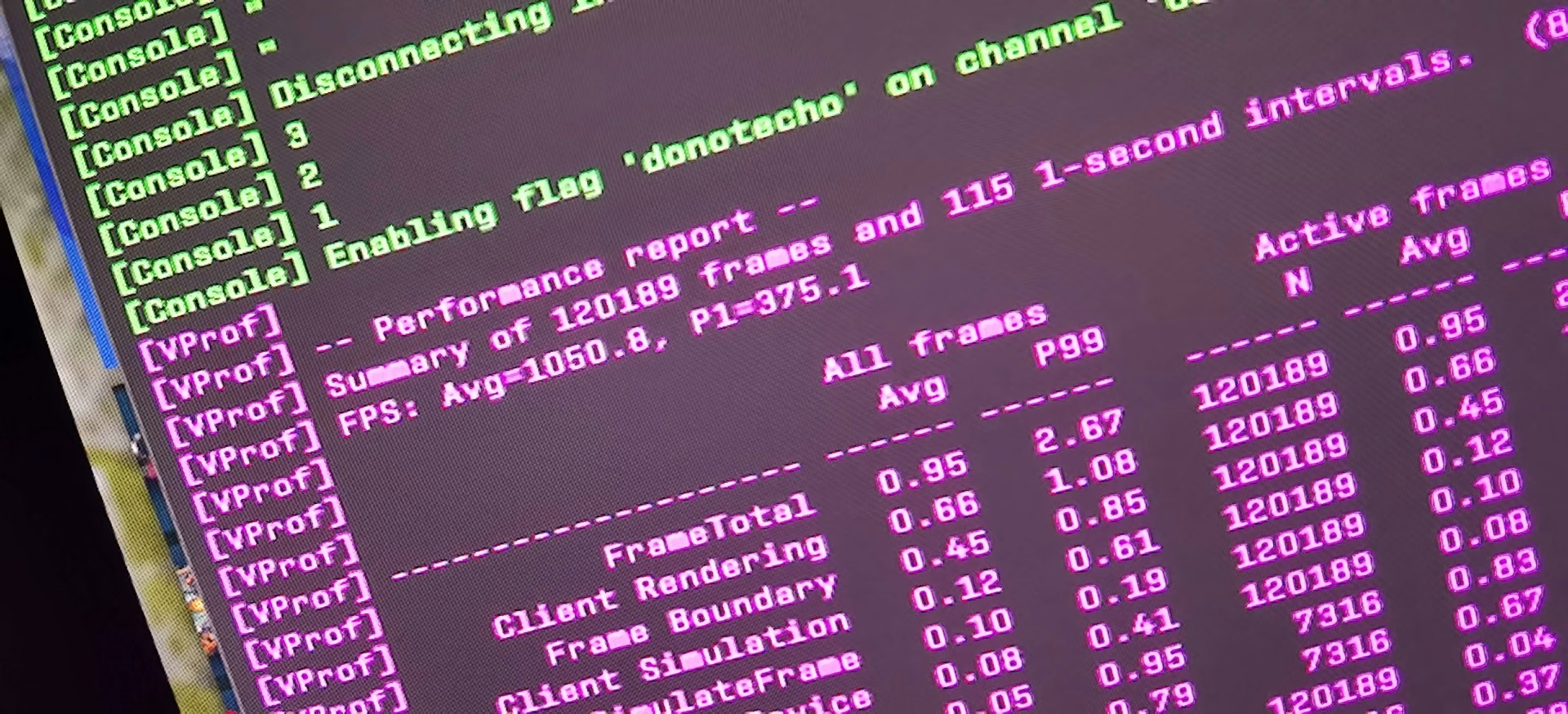
CS2 is famously unforgiving. On a fully configured UltimateMove machine - Ryzen 7 9800X3D, 32 GB DDR5 6400 CL34 and a Radeon RX 6800 XT, a GPU roughly three times weaker than an RTX 5090 - the frame rates land ahead of an unconfigured top-tier system at the same settings and the same resolution. At a fraction of the power draw and a fraction of the price.
The obvious caveat: this is a CPU and memory bound title. In a purely GPU-bound game no amount of configuration replaces silicon, and we say that up front, before you pay. But in the competitive titles most people actually climb in, the frames are hiding in the configuration.
Considering new hardware instead? See a PC built and configured by us.
FAQ
Is a remote PC optimization service safe for my anti-cheat?
Yes, as long as nothing touches game files. We configure Windows, drivers, BIOS and hardware only. No injection, no kernel-level tools. That keeps you clean with VAC, Vanguard, Ricochet, FACEIT and ESEA.
How much FPS will I gain?
It depends on how misconfigured the system is and where the bottleneck sits. The biggest jumps usually appear where memory runs at JEDEC defaults, VBS is enabled and the driver stack is cluttered - especially in 1% lows. Instead of promising percentages up front, we show you your own numbers before and after.
Can everything be reversed?
Yes. A full backup and system restore point is created before any change, and every change is documented.
How long does it take?
60 minutes for Windows 11 optimization and for troubleshooting, 90 minutes for Ultimate Optimization.
Do I need to be at the PC?
Yes, it is a live remote session on your machine. You watch every step, ask questions and can stop at any time.
Will Windows updates undo the work?
Some of it. VBS re-enabling itself after feature updates is the classic case. You get maintenance instructions during the session and six months of post-service support on Discord.
Is it worth it if my PC is brand new?
Often especially then. New systems ship with a default memory profile, default security settings and default power behaviour - exactly the configuration gaps that cost frames and milliseconds.
What if my hardware is the limit?
We will say so, and tell you which component upgrade would actually change your numbers, in order of value.
Claim your performance
Stop guessing which tweak from a YouTube thumbnail is worth applying. Get a baseline, a technician who explains every change, and an "after" benchmark you watched happen.
- See packages and book a remote PC optimization session
- Ultimate Optimization - 120 USD, 90 minutes+
- Windows 11 Gaming Optimization - 60 USD, 60 minutes+
- Gaming PC Troubleshooting - 50 USD, 60 minutes+
- Free optimization scanner on Discord
- More questions? Read the FAQ
Our free tools
Built in house. No account, no limits.
 Ultimate Demo Analyzer
Upload a CS2 demo and get your mistakes and round stats written out.
Free, no account Deadlock Replay Analyzer
The same for Deadlock: a replay breakdown and a plan for the next matches.
Free, no account Sensitivity Converter
Carry your cm/360 between games without losing muscle memory.
Free, no account Aim Trainer
Thirty seconds, three levels. No install, no account.
Free, no account