
Gears of War: E-Day PC requirements and FPS optimization
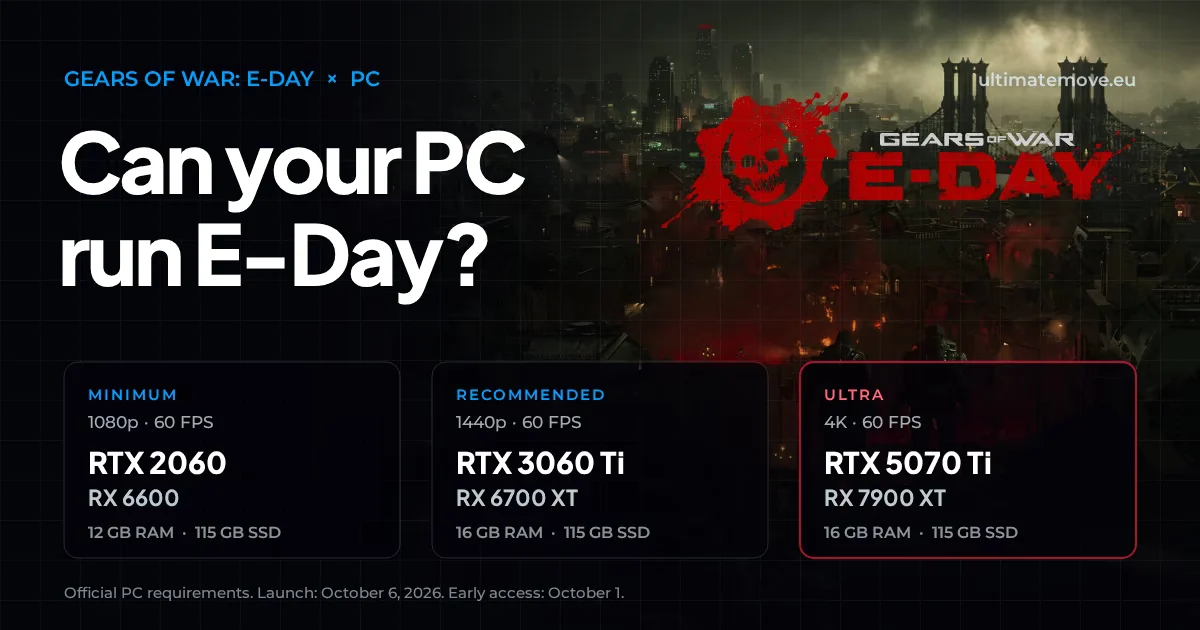
Gears of War: E-Day PC requirements come in three official profiles: from an RTX 2060 class card for 1080p at 60 frames to an RTX 5070 Ti for 4K Ultra. The game needs an SSD with 115 GB of free space, and it will not start from an HDD.
The game has been available since 6 October 2026 on Steam, in the Xbox app and in PC Game Pass. Below are the official requirements, the first full-release tests across 44 graphics cards and the settings worth starting from.
Official system requirements
| Minimum | Recommended | Ultra | |
|---|---|---|---|
| Target | 1080p, 60 FPS, Medium | 1440p, 60 FPS, High | 4K, 60 FPS, Ultra |
| CPU | Ryzen 5 2600X, Core i7-6850K or Core i5-10400 | Ryzen 5 5600 or Core i5-11600K | Ryzen 7 7800X3D or Core i7-14700K |
| Graphics card | RTX 2060 / RTX 5050, RX 6600 / RX 9060 | RTX 3060 Ti / RTX 5060, RX 6700 XT / RX 9060 XT | RTX 5070 Ti, RX 9070 XT |
| VRAM | 6 GB | 8 GB | 12 GB |
| RAM | 12 GB | 16 GB | 16 GB |
| Storage | 115 GB SSD | 115 GB SSD | 115 GB SSD |
The most important information sits in the graphics card row. The weakest supported cards are the RTX 2060 and the RX 6600, cards with hardware ray tracing. Older GTX series GeForce cards and Radeon RX 5000 cards do not meet the minimum requirements.
Why the game requires ray tracing
E-Day runs on Unreal Engine 5.8 and uses two of its lighting systems. Lumen calculates global illumination and ambient occlusion, and MegaLights allows ray-traced shadows from up to 100 light sources at once. Hence the hard floor: your card must have hardware ray tracing.
For you this means one thing: in this game lighting, not textures, will most likely cost your card the most. If you run short on frames after launch, check shadow and global illumination settings first, not texture quality.
Read nextMemory Integrity FPS lossMemory Integrity FPS loss measures 3.3 to 5.7 percent in an isolated test, not fifteen. Microsoft starts enabling the protection in October 2026.We connect to your PC remotely, save a restore point, then work through power, drivers and input. The BIOS we go through together on a Discord call while you show us the screen with your phone. The same benchmark at the end shows how much of it landed. For six months after the session we stay with you on Discord.
DLSS 4.5, FSR 4 and XeSS 3.0
From launch the game supports all three upscalers: DLSS 4.5 on Nvidia cards, FSR 4 on Radeons and XeSS 3.0 from Intel. RTX cards also get Dynamic Multi Frame Generation, which generates extra frames, and Nvidia Reflex, which lowers latency. The beta had only DLSS Super Resolution and Reflex, frame generation arrives with the full version.
Frame generation raises the FPS counter, but it does not make the game react faster to your mouse. In the campaign and Horde it is a good way to get a smooth image in 4K. In Versus 4v4, where every millisecond counts, it makes more sense to play without it, on the upscaler alone and with Reflex on.
Drivers and Windows 10
For the beta the publisher required at least Nvidia 610.74, AMD 26.7.1 and Intel 101.8864 drivers. Nobody has named the launch driver version yet. Nvidia announced that October 2026 is the last month of Game Ready releases for Windows 10, so it is not known whether the E-Day driver will still reach that system.
If you play on Windows 10 with a GeForce card, install the latest driver before October 1 and check in the NVIDIA app whether a version marked as prepared for Gears of War: E-Day shows up.
Best Gears of War: E-Day PC Settings
The full release brought the first reliable numbers. TechSpot tested 44 graphics cards on the built-in benchmark with a Ryzen 7 9800X3D. The key finding concerns presets: dropping from Ultra to High gives about 22% more FPS, and each further step down adds 11 to 22%. The Ludicrous preset costs 43 to 49% of your frames compared with Ultra.
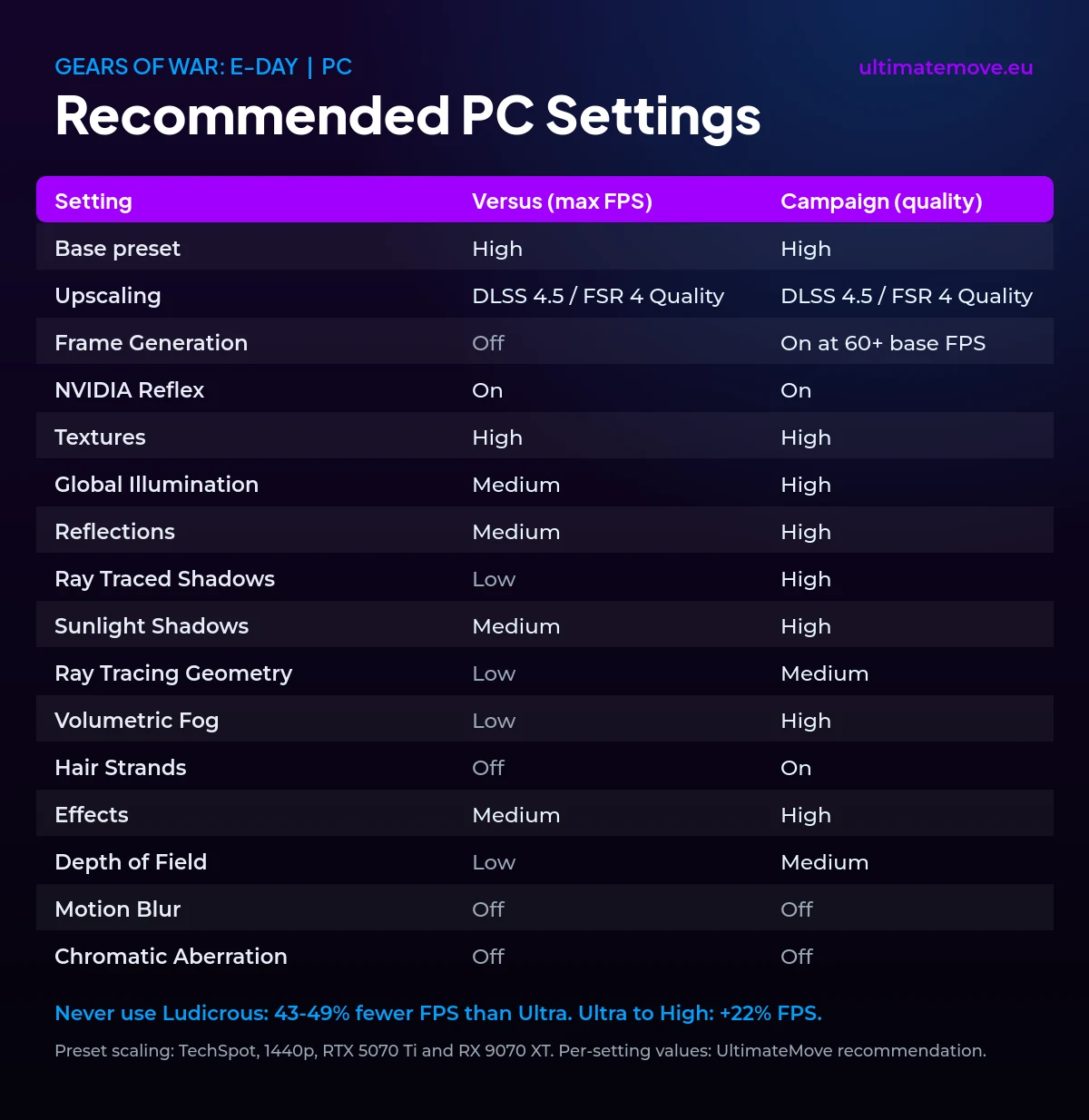
Treat the table as a starting point. The Versus column favours smoothness and readability in 4v4 fights, the campaign column favours looks. The per-setting values are our recommendation, because nobody has yet properly measured the cost of each option on its own, and the in-game benchmark does not show 1% lows. TechSpot named ray tracing noise on Ultra as the main image flaw and called the Medium preset surprisingly good-looking.
How much GPU you need according to these tests: about 60 fps at 1080p Ultra comes from the RX 9060 XT, RTX 5060 Ti, RTX 4070 and RX 7800 XT. Native 1440p at 60 FPS starts at the RX 9070 and RTX 4080. With Balanced upscaling the RTX 4060 Ti reaches about 60 FPS at 1440p. 8 GB of VRAM only gets in the way at native 4K Ultra, and upscaling removes that gap.
What to do, in order, when you are short on frames:
- Update your graphics driver. The full-release tests ran on Nvidia 617.14 and AMD Adrenalin 26.8.1, so there is no point staying on anything older.
- Turn on your card's upscaler: DLSS 4.5 on GeForce RTX, FSR 4 on Radeon RX 9000 series, XeSS 3.0 on Intel Arc. At 1440p and 4K these are the cheapest extra frames.
- When you are short on FPS, lower shadows and global illumination first. Lumen and MegaLights cost the most, touch textures last.
- In Versus 4v4, turn frame generation off and keep Nvidia Reflex on. A higher FPS counter does nothing if the game reacts to your mouse later.
When and where you can play
The game launched on 6 October 2026, and Premium Edition owners played from 1 October. On PC it is on Steam and in the Xbox app, and Game Pass Ultimate and PC Game Pass subscribers get it from day one at no extra cost.
Beta progress does not carry over to the full version. Only challenge rewards and beta cosmetics stay, while player and class levels start from zero.
What the beta showed
The beta ran over two weekends: August 6 to 10 for pre-order customers and Game Pass Ultimate and PC Game Pass members, and August 13 to 17 for everyone. It included Horde Siege and Versus 4v4. There was no campaign in it, and it is the campaign, with large locations and many lights, that will be the heaviest load for your PC.
I also test E-Day on stream at twitch.tv/karzye. I will add measurements from my own hardware here, next to the TechSpot data.
Gears of War: E-Day sets a clear hardware floor. The RTX 2060 and RX 6600 are the floor, 16 GB of RAM is enough even for the Ultra profile, and an SSD is mandatory. The Ludicrous preset costs the most frames because it pushes MegaLights, Lumen and Nanite to the maximum, and for Versus you are better off leaving frame generation off and relying on Reflex.
Frequently asked questions
Will Gears of War: E-Day run on a GTX 1080 or GTX 1660?
Officially no. The weakest supported Nvidia card is the RTX 2060, because the game requires hardware ray tracing, which GTX cards lack.
How much RAM does Gears of War: E-Day need?
12 GB at minimum settings and 16 GB at recommended. The publisher lists 16 GB for the 4K Ultra profile as well.
Can I install the game on an HDD?
No. The publisher requires an SSD, and the game is not supported on an HDD. Prepare 115 GB of free space.
How do I increase FPS in Gears of War: E-Day?
Update your driver, turn on your card's upscaler (DLSS 4.5, FSR 4 or XeSS 3.0), and when you are short on frames lower shadows and global illumination first. Start from the High preset instead of Ultra, which gives about 22% more frames, and do not turn on the Ludicrous preset.
Should I turn on frame generation in multiplayer?
In Versus, better not. Frame generation raises the FPS counter, but it does not shorten the delay between your mouse movement and the game’s reaction. For competitive play an upscaler and Reflex are enough.
Do beta results show the performance of the full game?
Only partly. The beta had Horde Siege and Versus, with no campaign and no DLSS frame generation. TechSpot has already tested the full release on 44 cards, and you will find the results above.
Frames dropping exactly when the fight starts?
That drop lands in the one second that decides the round, and no graphics preset fixes it. We tune Windows, drivers and network remotely, and the BIOS together with you on a Discord call. You measure it yourself, in your own game, before and after, with us watching.
See PC optimization →Six months of support after the session. Not sure it is worth it? Ask for a free check on our Discord first. KaRzye
Runs the research and every session at UltimateMove. FACEIT Level 10 in CS2,
Immortal in Valorant. Twenty years in BIOS, memory and drivers.
Watch him play.
KaRzye
Runs the research and every session at UltimateMove. FACEIT Level 10 in CS2,
Immortal in Valorant. Twenty years in BIOS, memory and drivers.
Watch him play.
Our free tools
Built in house. No account, no limits.
 Ultimate Demo Analyzer
Upload a CS2 demo and get your mistakes and round stats written out.
Free, no account Deadlock Replay Analyzer
The same for Deadlock: a replay breakdown and a plan for the next matches.
Free, no account Sensitivity Converter
Carry your cm/360 between games without losing muscle memory.
Free, no account Aim Trainer
Thirty seconds, three levels. No install, no account.
Free, no accountKeep reading
 Gaming Research
NVIDIA GPU overclocking: core, memory and the FPS drop trap
2026-09-28·5 min read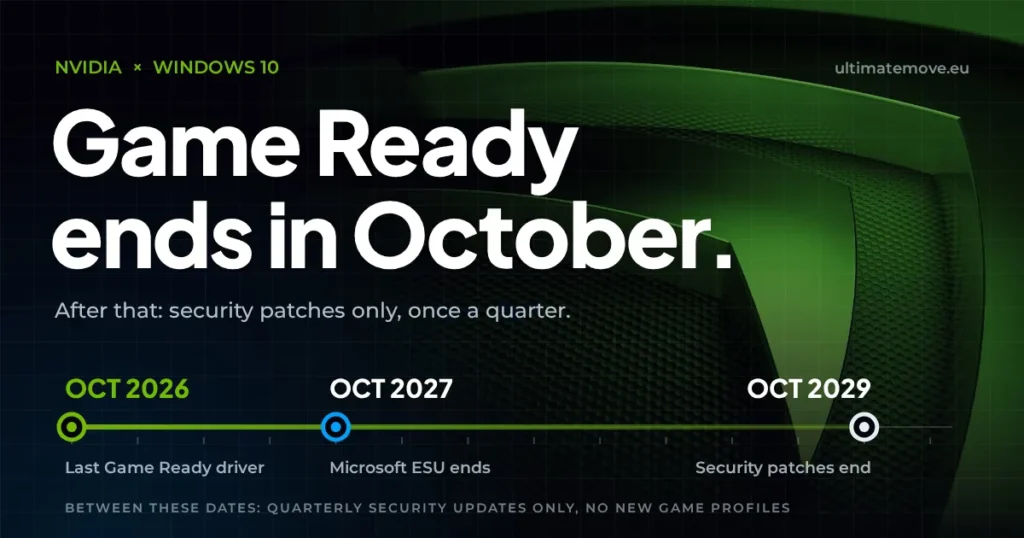 Gaming Research
Nvidia Windows 10 drivers: the last Game Ready release comes in October 2026
2026-09-28·5 min read Gaming Research



If anyone want’s to play in co-op - hop on Discord - https://discord.gg/cXJ6XxQU8G
You must be logged into post a comment.