Steam Deck average FPS: what to check before buying a game
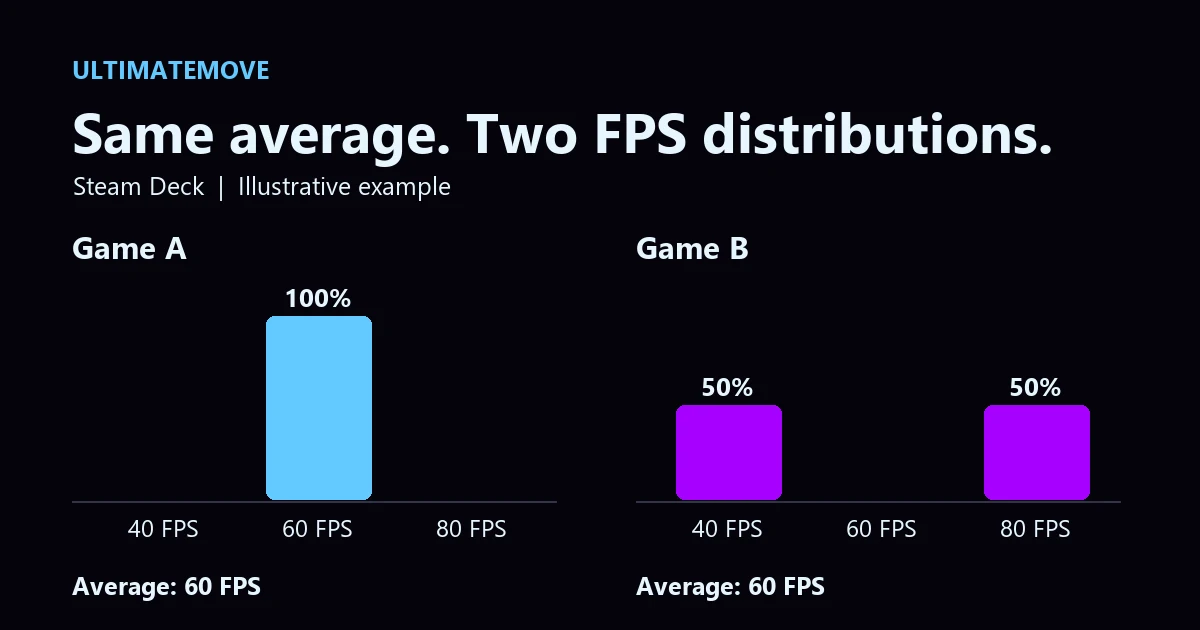
Steam Deck average FPS is available on a game's Steam store page. Open Steam Deck Compatibility, select Learn more, and expand the chart. If the average looks good, check whether the samples cluster around that figure. One number can hide two very different experiences.
Where the numbers come from
Valve collects anonymized samples from Steam Deck players who opt in. The chart shows the share of samples at each frame rate. Valve filters the dataset to devices using their default frame limit, 60 FPS on LCD and 90 FPS on OLED. In-game graphics settings can vary. Steam made these figures available in the stable client as well on November 11. Valve's announcement and example charts
Same average, different game
Take two simplified distributions. Game A records every sample at 60 FPS. In Game B, half the samples are at 40 FPS and half at 80 FPS. Both average 60. If I wanted to buy a game for a trip and knew nothing else about it, I would start with A. For B, I would look at footage and the author's settings before buying.
This is a worked example from UltimateMove. A histogram does not show the order of the samples. A demanding area and a mix of player settings can produce similar distributions. If you own the game, run the same scene a few times and compare frametimes. Frametime test protocol
We connect to your PC remotely, save a restore point, then work through power, drivers and input. The BIOS we go through together on a Discord call while you show us the screen with your phone. The same benchmark at the end shows how much of it landed. For six months after the session we stay with you on Discord.
Why an OLED game might cluster around 45 and 90 FPS
Valve gives an example where VSync produces samples around 45 and 90 FPS. The game follows the display's refresh timing, repeating a frame when it misses a refresh. This can leave a gap in the chart. If you want a particular frame-rate cap or use the LCD Deck, check footage from the same model at similar settings.
Steam Deck frame-rate questions
Where is the chart?
Open the game's Steam Deck compatibility details and expand the frame-rate data when available.
Does every game have data?
Valve provides it for titles it has tested for compatibility and collected data on.
Does Deck Verified guarantee 60 FPS?
The badge reflects compatibility criteria. Check the frame-rate data separately.
Is average FPS the same as 1% lows?
An average reflects all samples. A 1% low metric focuses on slower frames under the tool's calculation method.
Can I use it to predict desktop FPS?
The chart measures Steam Deck. For your desktop, find a test with similar parts and settings.
Does the chart show where the game stutters?
Use gameplay footage with a frametime capture to locate a stutter in a specific scene.
Frames dropping exactly when the fight starts?
That drop lands in the one second that decides the round, and no graphics preset fixes it. We tune Windows, drivers and network remotely, and the BIOS together with you on a Discord call. You measure it yourself, in your own game, before and after, with us watching.
See PC optimization →Six months of support after the session. Not sure it is worth it? Ask for a free check on our Discord first. KaRzye
Runs the research and every session at UltimateMove. FACEIT Level 10 in CS2,
Immortal in Valorant. Twenty years in BIOS, memory and drivers.
Watch him play.
Our free tools
Built in house. No account, no limits.
 Ultimate Demo Analyzer
Upload a CS2 demo and get your mistakes and round stats written out.
Free, no account Deadlock Replay Analyzer
The same for Deadlock: a replay breakdown and a plan for the next matches.
Free, no account Sensitivity Converter
Carry your cm/360 between games without losing muscle memory.
Free, no account Aim Trainer
Thirty seconds, three levels. No install, no account.
Free, no account