UDA - Ultimate Demo Analyzer: A Free CS2 Demo Analysis Tool That Will Change Your Rank
Every CS2 player who wants to really advance - whether in Premier, Competitive, or FACEIT - sooner or later hits the same wall: you don't know what you're doing wrong because you're not looking at your games from the outside. Watching demos in the CS2 client is a tedious task. Paid tools such as Scope.gg, Noesis, and Skybox Edge are good, but they require an account, uploading a file to a server, and often a paid subscription.
As a Faceit Level 10 Coach and Head of UltimateMove, as well as the main provider of all the services we offer, I created UDA: Ultimate Demo Analyzer. It is a free, local tool, open for the entire lifetime of the UltimateMove brand. And yes - it works directly in your browser, without installation, without an account, without uploading demos to third-party servers.
What is UDA - Ultimate Demo Analyzer?
UDA is a free CS2 dem analyzer created by UltimateMove, available at ultimatemove.eu/uda. The tool analyzes .dem files locally - the file never leaves your computer. Just drag the file to the website and in a few seconds you will get a full overview of your gameplay.
Currently, UDA is in version v0.1337 Early Alpha and supports CS2 demos - both from Valve Matchmaking (Premier / Competitive) and FACEIT. Future versions will bring improved heatmap maps and additional analysis features. Support for other games is also planned.
UDA will always remain free - it is funded directly by KaRzye (UltimateMove.eu) and does not depend on subscriptions or advertising.
Why is Dem Analysis Key to Improvement in CS2?
Before we move on to the UDA function, it is worth answering the question: why analyze demos at all?
The best players in the world-from FACEIT Level 10 to the pro scene-consider reviewing demos an essential part of their training. Here's what analyzing replays gives you:
- Identification of positional errors - you can see exactly where you are standing too weakly or too aggressively
- Round economics analysis - you understand when you buy poorly and lose rounds due to poor cash management
- Reading your opponent - recognize your rivals' behavior patterns that you can use in the next match
- Util usage analysis - check whether your grenades, smoke grenades, and flashbangs are actually working
- Cheater detection - demos allow you to check if someone used unauthorized programs during a match.
The problem is that the standard demo viewer in CS2 is inconvenient and slow. External paid tools cost from several dozen to several hundred zlotys per month. UDA solves this problem once and for all - for free.
BIOS, memory, network and input we go through together on your screen. We measure before and after in your games, so you see the difference yourself, before we hang up.
UDA Features - What Does Ultimate Demo Analyzer Offer?
🗂️ Dem support from Valve MM and FACEIT
UDA supports demos from the two most popular platforms:
Valve Matchmaking (Premier / Competitive): Launch CS2, open the Watch matches and tournaments → My matches tab, and download the .dem file from the download button. The file goes to the Steam/steamapps/common/Counter-Strike Global Offensive/game/csgo/replays/ folder. Then drag it to UDA - done.
FACEIT:
Go to your match history on FACEIT, open the match, and go to the Room → Watch demo tab. Download the .zst file, unzip it (e.g., using 7-Zip) to a .dem file, and "upload" it to UDA.
📊 Overview - Full Match Review
The Overview tab is your starting view after loading the demo. Here you get a condensed overview of the entire match: round scores, player statistics, general information about the map, and the course of the game. It's the perfect place to quickly assess which rounds are worth reviewing in more detail.
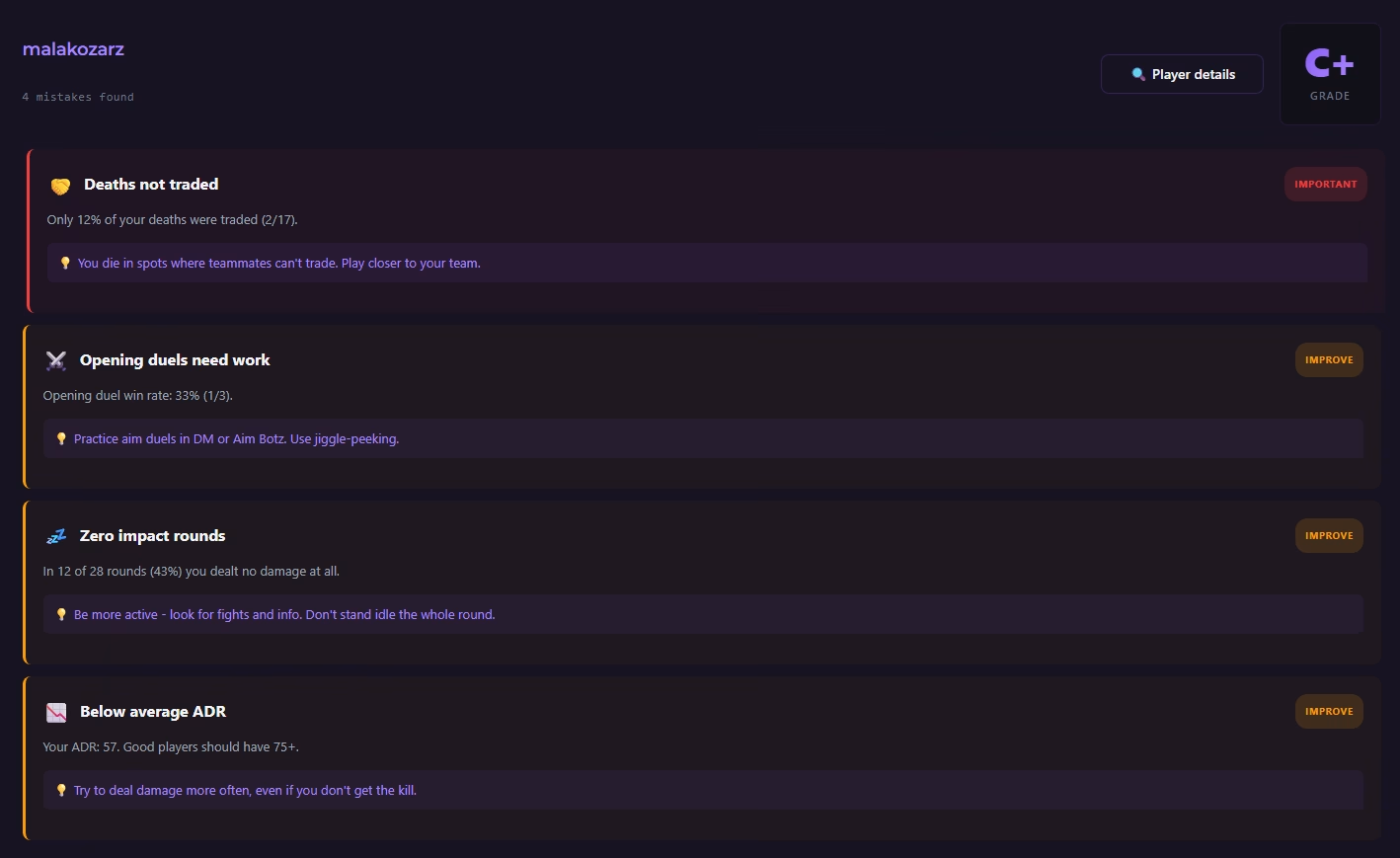
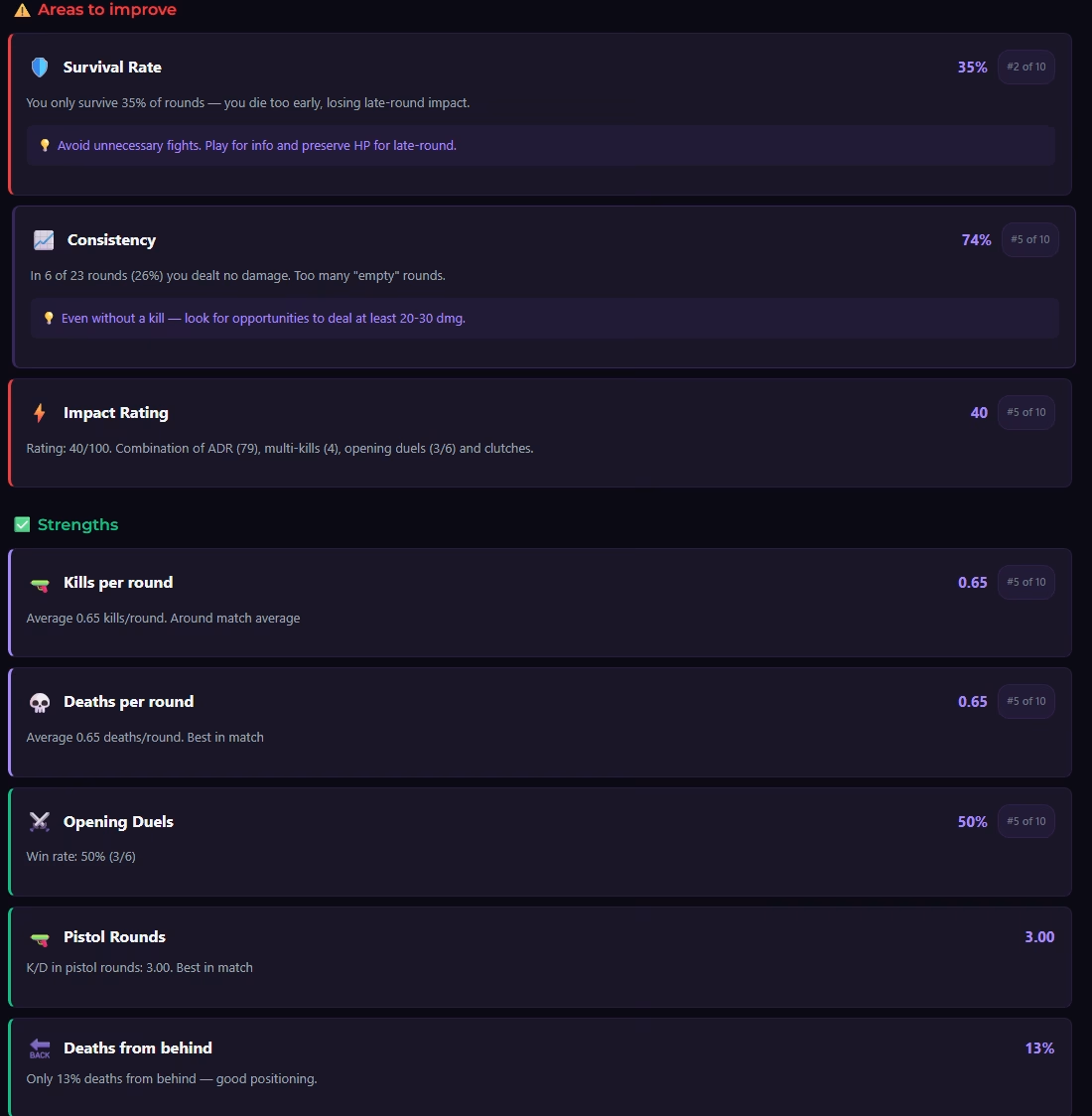
🎮 Gameplay Analysis - In-depth Gameplay Analysis
This is the heart of UDA. The Gameplay Analysis tab allows you to drill down to individual rounds and events. You analyze tactical decisions, positioning, timing of site entries, and key moments in the match.
This is where you will find answers to the questions every player asks after losing a match: Why did we lose this round? Where did I go wrong? What could I have done differently?
🗺️ Heatmap - Heat Map of Your Movement and Kills
Heatmaps are one of the most powerful tools in every player and coach's arsenal. UDA generates a heatmap showing where you moved most often on the map, where you died, and where you got frags.
With a heatmap, you can see in seconds:
- Do you play too much in the same places (and let your opponents "read" you)?
- Which positions are deadly for you - and why
- Does your movement on the map make tactical sense?
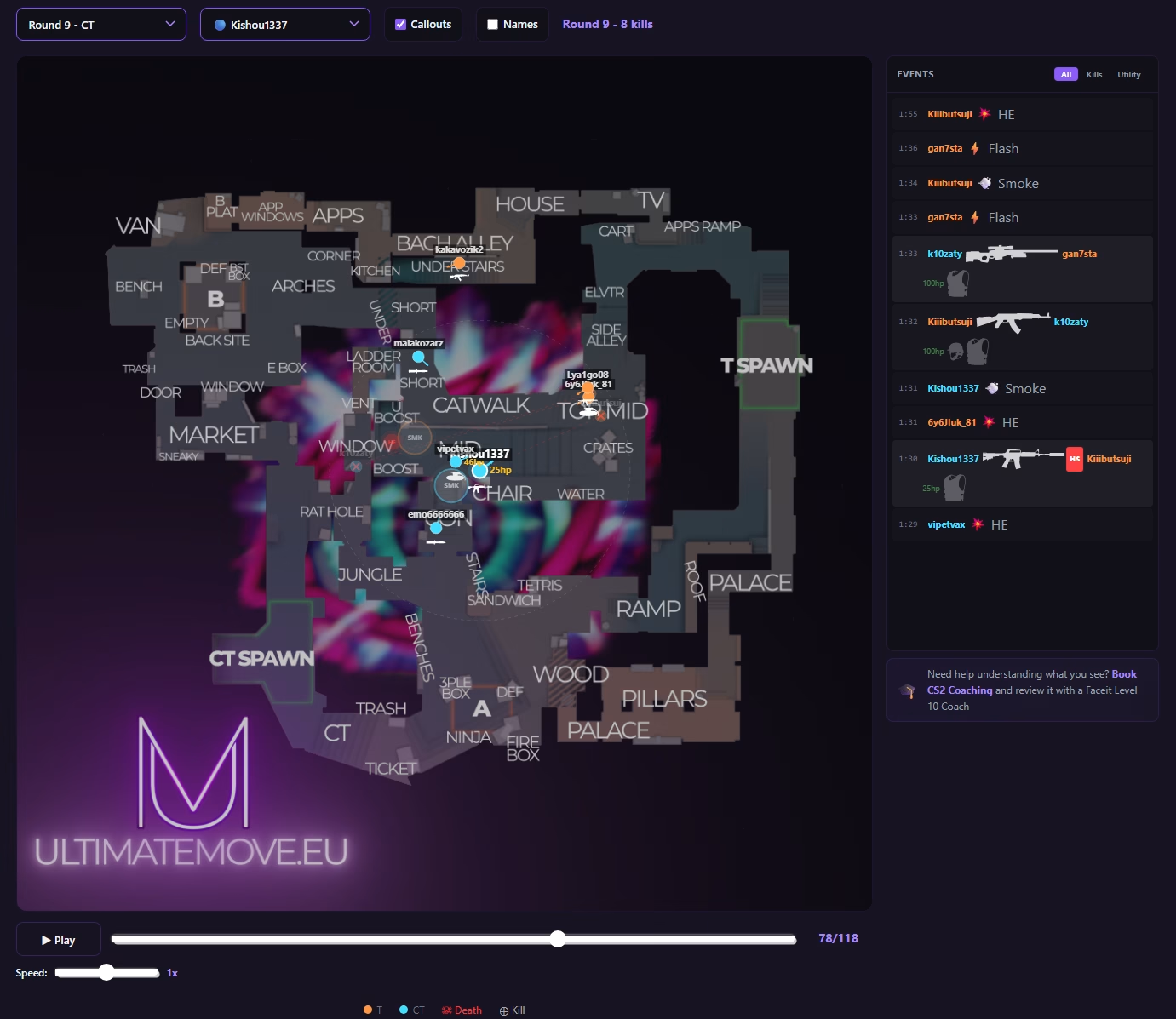
Work is currently underway on correct maps for all supported CS2 maps - subsequent iterations of UDA will bring these improvements.
🛡️ Anti-Cheat - Verification of Suspicious Behavior
The Anti-Cheat tab is a unique module that allows you to analyze player behavior for potential cheating. If you had suspicions about someone in a match, here you can collect data and verify those suspicions based on actual moves from the demo.
🔒 Privacy - The File Never Leaves Your Computer
This is one of UDA's key advantages over the competition. The analysis takes place locally, in your browser. No .dem files are sent to any server. Your data and your matches are yours alone.
Most platforms as well as some included in this article analyse the demo file through server downloads inbetween either Valve/Faceit etc and their servers. We require you to download the demo and analyze it through our algo with your own PC power.
How to Use UDA - Step by Step
Step 1: Download the demos
Download the .dem file from CS2 (Valve MM) or from FACEIT (.zst → unzip to .dem).
Step 2: Go to ultimatemove.eu/uda
No installation. No login. No account creation.
Step 3: Drag the .dem file onto the page
Or click to browse for files. The analysis will start automatically.
Step 4: Review your results
Use the Overview, Gameplay Analysis, Heatmap, and Anti-Cheat tabs to get the most out of your match.
UDA vs. the Competition - Why Choose UltimateMove?
| Function | UDA (UltimateMove) | Scope.gg | Noesis | Skybox Edge |
|---|---|---|---|---|
| Price | ✅ Always Free | Freemium / paid | Paid | Freemium / paid |
| Local analysis | ✅ Yes | ❌ No | ❌ No | ❌ No |
| Installation | ✅ None | ❌ Account required | ❌ Account required | ❌ Account required |
| Heatmaps | ✅ Yes | ✅ Yes | ✅ Yes | ✅ Yes |
| Anti-Cheat Analysis | ✅ Yes | ❌ | ❌ | ❌ |
| Valve MM + FACEIT | ✅ Yes | ✅ Yes | ✅ Yes | ✅ Yes |
| Open development | ✅ Transparent | ❌ | ❌ | ❌ |
Combine UDA with Coaching - A Real Ranking Boost
Demographic analysis is a powerful tool, but it is not sufficient on its own. You can see that you are failing in the same place ten times over, but you do not always know how to fix it.
That's why UDA works best in combination with coaching from KaRzye - FACEIT Level 10 with over 500 analyzed demos under his belt. Individual sessions include reviewing your demos, analyzing your strategy, accuracy training, and working on your mindset.
Players working with KaRzye advance by an average of 3+ FACEIT levels.
The Future of UDA - What Are We Planning?
UDA is actively developing. Here is what we are planning for future versions:
- Revised maps for heatmap analysis for all current CS2 maps
- Improved gameplay visualizations - more detailed analysis of rounds
- Support for other games - plans are in place to expand UDA beyond CS2 (Valorant, other FPS titles)
- Further improvements to the Anti-Cheat module
The project is funded by KaRzye out of his own pocket and will be free for as long as the UltimateMove brand exists.
So what you need?
UDA - Ultimate Demo Analyzer is the best free CS2 demo analyzer on the market for players who value privacy, simplicity, and efficiency. No registration, no file uploads, no fees - just pure analysis of your gameplay right in your browser.
If you're serious about advancing in CS2, analyzing your demos is a must. And now you have the best free tool for the job.
Analyze the demo - it's worth it, you'll develop faster! → ultimatemove.eu/uda/
 KaRzye
Runs the research and every session at UltimateMove. FACEIT Level 10 in CS2,
Immortal in Valorant. Twenty years in BIOS, memory and drivers.
Watch him play.
KaRzye
Runs the research and every session at UltimateMove. FACEIT Level 10 in CS2,
Immortal in Valorant. Twenty years in BIOS, memory and drivers.
Watch him play.
Our free tools
Built in house. No account, no limits.
 Ultimate Demo Analyzer
Upload a CS2 demo and get your mistakes and round stats written out.
Free, no account Deadlock Replay Analyzer
The same for Deadlock: a replay breakdown and a plan for the next matches.
Free, no account Sensitivity Converter
Carry your cm/360 between games without losing muscle memory.
Free, no account Aim Trainer
Thirty seconds, three levels. No install, no account.
Free, no account